
Keep working in Sortly even when you lose signal. Sortly works best when your devices can sync in real time, but that is not always possible. Offline mode lets you keep updating your inventory in a warehouse basement or at a remote job site, then send your changes to every device once you are back online. This article walks you through how offline mode works, how to switch to it, and how to sync your changes when you reconnect.
In this article
How offline mode works
Offline mode pauses syncing on your device. While sync is paused, the changes you make update inventory levels on that device only. When you reconnect and sync again, your changes go to the server and show up on every other device on your account.
Switch to offline mode
Heading somewhere without a reliable connection? Set this up on your phone or tablet before you go.
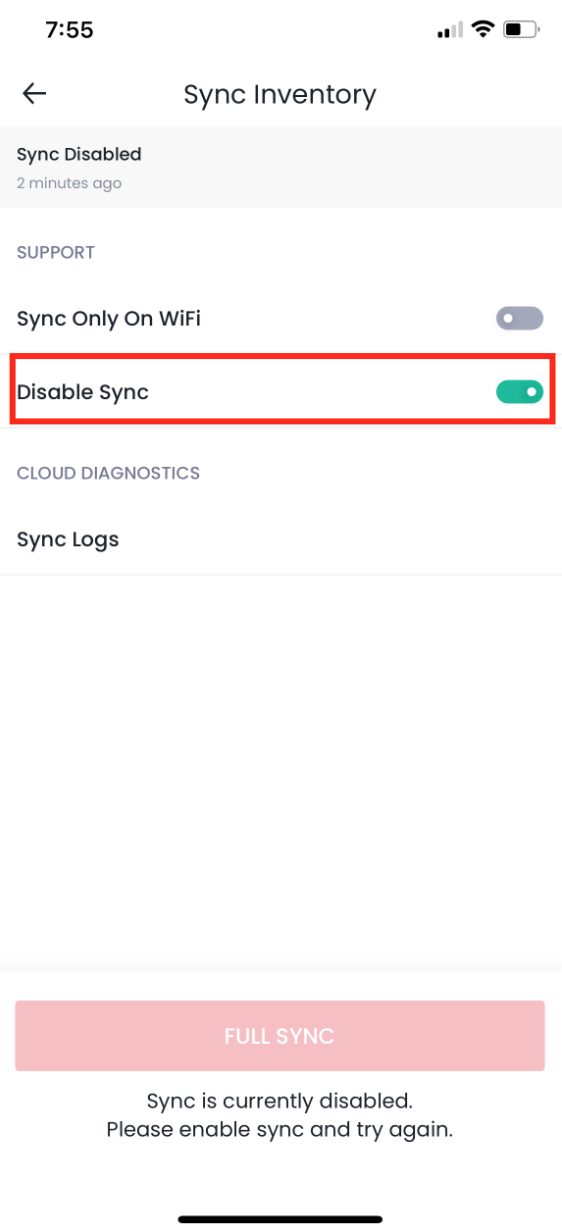
Sync your changes
Back on WiFi, LTE, or 5G? Go to Menu > Sync Inventory and tap Disable Sync again so sync resumes. Your inventory changes go to the server and show up across all your devices.