---
title: What is a Unique Item?
description: Unique Items allow you to add and track the product lines, SKUs, equipment types etc. in your inventory.
---
[Skip to content](https://help.sortly.com/what-is-a-unique-item#main-content)

Open main navigation
Close main navigation
Looking for answers? Start here.
- There are no suggestions because the search field is empty.
1. [Sortly Help Center](https://help.sortly.com/?hsLang=en)
2. [FAQs](https://help.sortly.com/faqs?hsLang=en)
3. [FAQ](https://help.sortly.com/faqs?hsLang=en#faq)
# What is a Unique Item?
Keep track of how much of your plan you're using by understanding what counts as a Unique Item. Unique Items are the product lines, SKUs, and equipment types you add and track in your inventory, and knowing what counts toward your limit helps you plan ahead. This article walks you through what a Unique Item is, the limit for each plan, what does and doesn't count, and where to find your current count.
Free
Advanced
Ultra
Premium
Enterprise
In this article
1. [What a Unique Item is](https://help.sortly.com/what-is-a-unique-item#what-is-a-unique-item)
2. [Unique Item limits by plan](https://help.sortly.com/what-is-a-unique-item#unique-item-limits)
3. [What counts toward your limit](https://help.sortly.com/what-is-a-unique-item#what-counts)
4. [Find your Unique Item count](https://help.sortly.com/what-is-a-unique-item#find-your-count)
### What a Unique Item is
Unique Items let you add and track the product lines, SKUs, equipment types, and other things in your inventory. A Unique Item is defined by its Sortly ID (SID). Quantities of a Unique Item do not count towards your Unique Item limit.
---
### Unique Item limits by plan
Plan
Unique Item limit
Free
Up to 100 Unique Items
Advanced
Up to 500 Unique Items
Ultra
Up to 2,000 Unique Items
Premium
Up to 5,000 Unique Items
Enterprise
10,000+ Unique Items
If you reach your plan's item limit, you can delete existing items to free up space for new ones.
---
### What counts toward your limit
- The quantity of an item does not affect your Unique Item count.
- Item clones that share a SID do not affect your Unique Item count.
- Variants always have their own unique SIDs, so each one counts toward your Unique Item limit.
---
### Find your Unique Item count
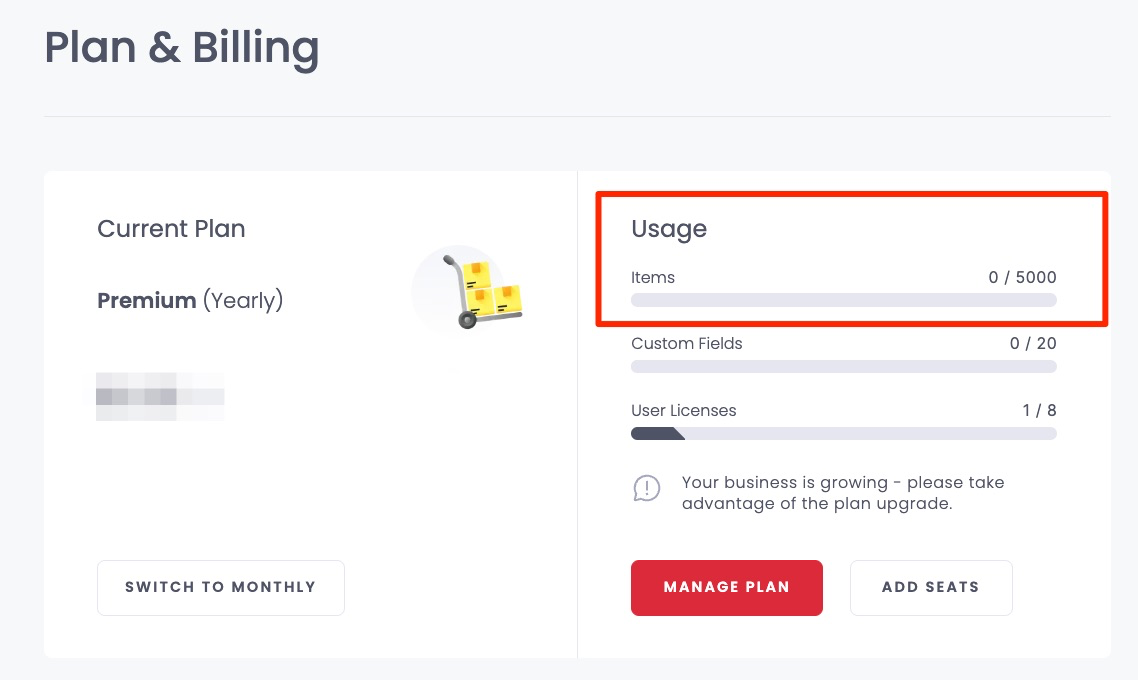
You can find your current count in the billing info section of the web app at [https://app.sortly.com/billing-info](https://app.sortly.com/billing-info). On the Plan & Billing page, the count appears next to Items under Usage, as shown below.
[](https://www.sortly.com/)
Copyright © 2026, Sortly Inc.