Limited Access is a lightweight role for field and warehouse teams who need to scan, move, and update inventory, without full admin access to reports, settings, or item details. It's a cost-effective way to extend Sortly to more users while staying in control of who can do what.
⚠️ Available only on Enterprise plans. Contact your Customer Success Manager to enable this role.
Typical Users of the Limited Access Role
This role is ideal for team members who regularly interact with inventory but don't need full system access. Examples include technicians, warehouse staff, site managers, and delivery drivers.
These users are often:
- Receiving goods and re-stocking shelves
- Picking or removing items to fulfill an order
- Scanning inventory using barcodes or Bluetooth-enabled devices
- Updating item counts and associating items with jobs, sites, or projects
What Limited Access Users Can and Cannot Do
| Access |
Available to Limited Users? |
| View inventory items |
Yes |
| Scan and move items |
Yes |
| Update item quantities |
Yes |
| View Pick Lists |
Yes |
| Use saved addresses in Pick Lists |
Yes |
| Create Pick Lists |
Yes |
| Edit Pick Lists |
Yes if they're the current assignee, or the creator (even if assigned to someone else) |
| Assign Pick Lists |
Yes if they're the current assignee, or the creator (even if assigned to someone else) |
| Edit item properties (name, image, notes, etc.) |
No |
| Manage folders or categories |
No |
| Create or modify saved addresses |
No |
| Access or generate reports |
No |
| Manage team permissions or account settings |
No |
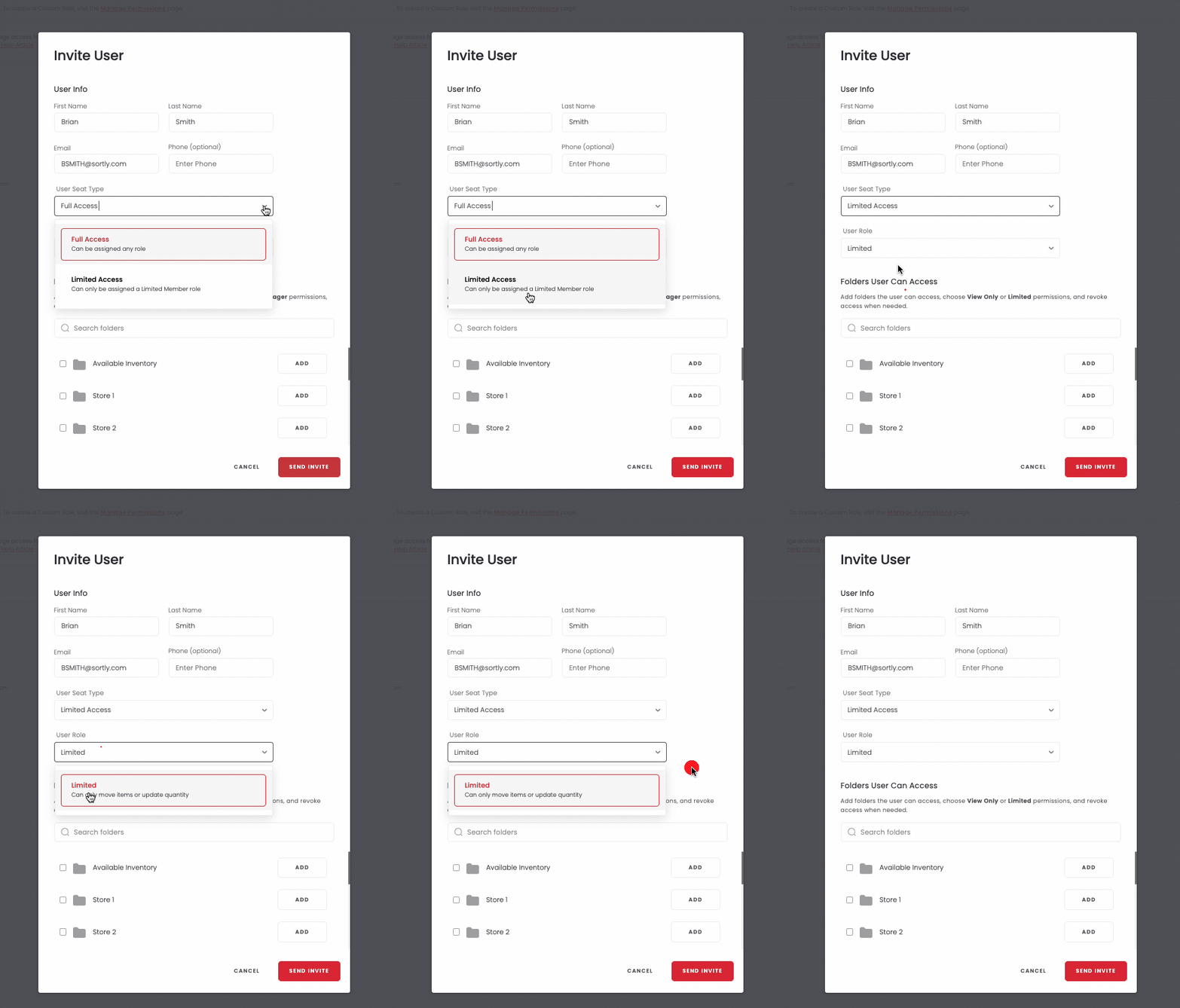
How to Add a Limited Access User
To invite someone as a Limited Access user:
-
1Go to your Manage Permissions settings in Sortly
-
2Click Invite User
-
3Under User Seat Type, choose Limited Access, then Limited for the Role
-
4Complete the rest of the invitation process and send
Frequently Asked Questions
Can a Limited Access user access saved addresses?
They can view saved addresses, but not add, edit, or delete them.
Does Pick List access change any of the user's other permissions?
No. All other Limited Access permissions remain unchanged.
Can Limited Access users use both the web and mobile apps?
Yes. They can access all available Limited role functions across platforms.
How is a Limited Access seat billed?
It's a lower-cost license compared to full-access seats. Contact your Customer Success Manager for pricing details.
Can I customize what Limited Access users can do?
Not at this time. This role has a fixed set of permissions. If you need more flexibility, consider using
Custom Roles.