---
title: Sortly API Overview
description: The Sortly API lets you connect Sortly to other tools and automate parts of your workflow.
---
[Skip to content](https://help.sortly.com/sortly-api-overview#main-content)

Open main navigation
Close main navigation
Looking for answers? Start here.
- There are no suggestions because the search field is empty.
1. [Sortly Help Center](https://help.sortly.com/?hsLang=en)
2. [Customizing Account](https://help.sortly.com/customizing-account?hsLang=en)
3. [Integrations](https://help.sortly.com/customizing-account?hsLang=en#integrations)
# Sortly API Overview
The Sortly API lets you connect Sortly to other tools and automate parts of your workflow, like keeping inventory in sync with another system or triggering purchase orders automatically. The API is self-service, so you'll want a developer on hand to build and maintain the integration using our documentation.
Enterprise
In this article
1. [How the API works](https://help.sortly.com/sortly-api-overview#how-it-works)
2. [Who has access](https://help.sortly.com/sortly-api-overview#who-has-access)
3. [Finding your API key](https://help.sortly.com/sortly-api-overview#find-api-key)
4. [What you can do with the API](https://help.sortly.com/sortly-api-overview#what-you-can-do)
5. [Automating Jobs](https://help.sortly.com/sortly-api-overview#jobs-api)
6. [Automating Purchase Orders](https://help.sortly.com/sortly-api-overview#po-api)
7. [Frequently Asked Questions](https://help.sortly.com/sortly-api-overview#faq)
### How the API works
You'll connect using a key pair generated right in your Sortly account. Authentication uses OAuth 2.0, your secret key is passed as a Bearer token in the request's Authorization header, and all requests are made over HTTPS. Responses come back in a standard format that's easy to build against.
The API allows up to 1,000 requests every 15 minutes. Each response includes headers showing your limit, how many requests you have left, and when the window resets. Going over the limit returns an HTTP 429 error until it resets.
For technical questions about building your integration, reach our developer support team at [dev-support@sortly.com](mailto:dev-support@sortly.com). For account or billing questions, please [contact our Support team](https://help.sortly.com/hc/en-us/requests/new?hsLang=en) instead.
### Who has access
The Sortly API is available on the Enterprise plan. Only the account Owner can generate or manage API keys.
### Finding your API key
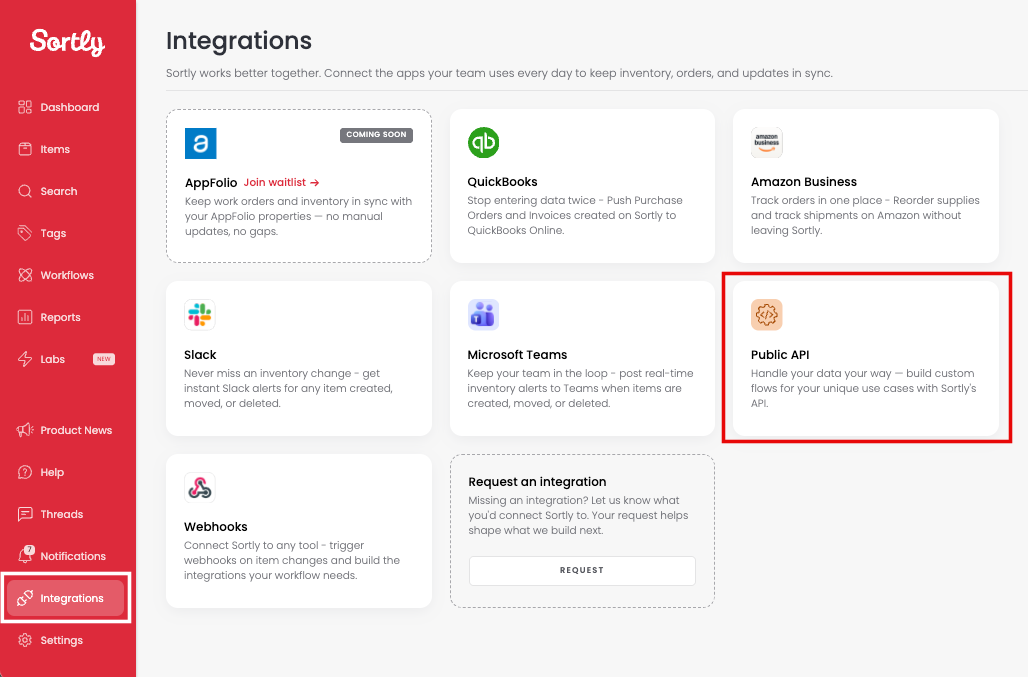
1. 1**Go to the Integrations tab, then click Public API**
2. 2**Click Create Key Pair**
This generates a unique API key for your account.

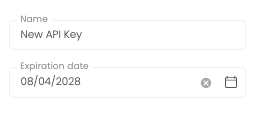
3. 3**Name your key and set an expiration date if you'd like, then click Create**
4. 4**Save your Public Key and Secret Key**
You'll only see the Secret Key once, so make sure to save it somewhere safe before closing the window.
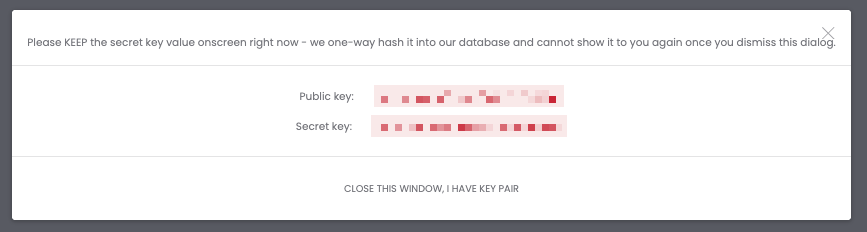
5. 5**Click Close this window, I have a key pair**
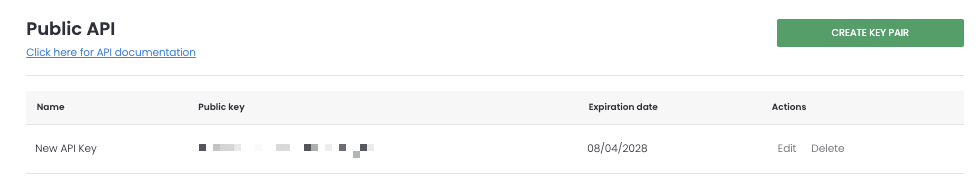
6. 6**Find your active key anytime under Integrations, Public API**
You can edit or delete your key from there using the options next to it.
### What you can do with the API
The Sortly API can be used to work with:
- Items and folders
- Item variants (called Item Groups in the API)
- Units of measure
- Custom fields
- Alerts
- Jobs
- Purchase orders
For full technical details on each of these, visit our [API Documentation](https://developer.sortly.com/).
### Automating Jobs
If you manage inventory for specific jobs, you're probably already using a folder for each one, the same way you would for a location or work order. The Jobs API builds on that idea: it creates a dedicated folder for each job and tracks its status as work moves from not started to in progress to completed.
With it, you can create jobs, move items into and out of the job folder, and update a job's status automatically. This is useful if you're syncing jobs from a field service or scheduling system and want Sortly to stay in step without manual updates.
See the [Jobs API documentation](https://developer.sortly.com/jobs) for full details.
### Automating Purchase Orders
The API can also create purchase orders, add items to them from your inventory, and record what's been received as stock comes in. This is helpful if you want to trigger reorders automatically when stock runs low, or feed purchase order data into another system like your accounting or ERP software.
See the [API Documentation](https://developer.sortly.com/) for the Purchase Orders section and full details.
### Frequently Asked Questions
What is an API?
An API (Application Programming Interface) lets software developers connect two applications so they can share information and automate tasks between them. Popular examples include the APIs for Google Maps and YouTube.
Why can't I access the API?
API access is only available on the Enterprise plan, and only the account Owner can generate or manage keys. If this is something you need, please [contact our Support team](https://help.sortly.com/hc/en-us/requests/new?hsLang=en) to learn more.
Can Sortly build my integration for me?
API integrations are self-service, so you'll need a developer to build and manage the connection. Our documentation gives your team everything they need to get started.
What's the rate limit for the API?
You can make 1,000 requests per API in a 15-minute window. Rate limit details are included in the response headers.
Can I add or update items and folders using the API?
Yes. The API can be used to create and update items and folders.
If a change is made through the API, who shows up as the user in reports?
Changes made through the API show up as a user named after your key, formatted like "KeyName (Public API)." That way, you can always tell which changes came through your integration.
Do I need the API to connect other tools to Sortly?
Not always. Sortly has ready-made integrations you can turn on directly from the Integrations tab, including QuickBooks Online, Amazon Business, Slack, and Microsoft Teams, with more on the way. If you need something those don't cover, you can use [Webhooks](https://help.sortly.com/webhooks-via-sortly-api?hsLang=en) for lighter-weight, event-based connections, or build a custom integration with the Public API.
How do I request a new integration?
On the Integrations tab, find the Request an integration card and click Request. Tell us which tool you'd like to see and how you'd use it, the more detail you share, the better we can prioritize it, then click Submit. Every request helps shape what we build next.
How can I tell if another piece of software can integrate with Sortly?
Check with that software's provider to see if they offer their own API. If they do, an integration with Sortly may be possible, though we can't guarantee compatibility with every third-party API.
[](https://www.sortly.com/)
Copyright © 2026, Sortly Inc.